
In today’s world, we use mobile phones and computers every day. We play games, use apps like WhatsApp, Instagram, YouTube, and many more. But have you ever wondered who makes these apps? And how do they make them? Well, all these apps are created using something called coding. And to write that code, people use special tools. One of these tools is called Xcode.
Let us explore what Xcode is, why it is used, and how it is helpful – all in a simple and interesting way.

Let’s start with a small story
Ravi is a 10-year-old boy from Pune. He loves playing games on his iPad. One day, he thought, “Can I make my own game? That would be so cool!” His elder sister Priya, who is learning computer science in college, smiled and said, “Of course you can! You just need to learn how to code and use a tool called Xcode.”
Now Ravi was curious. What is this Xcode? How does it help in making games and apps? Let’s find out together with Ravi.
What exactly is Xcode?
Xcode is a special software made by a company called Apple. Apple is the company that makes iPhones, iPads, MacBooks, and iMacs. Xcode helps people make apps for Apple devices like the iPhone, iPad, Mac, Apple Watch, and Apple TV.
You can think of Xcode as a big notebook where you can write all your coding ideas, test them, check for mistakes, and finally create your app or game. It is like a workshop for young inventors who want to build something cool.
People who want to become app developers for Apple devices must use Xcode. It is available for free, but only on Apple computers like MacBook or iMac. So if you have a Mac, you can go to the App Store and download Xcode easily.
Why is Xcode so useful?
Now you might think, “There must be many tools for making apps. Why Xcode?” That’s a good question.
Here’s why Xcode is so helpful:
- It is made by Apple, so it works best for making iPhone and iPad apps.
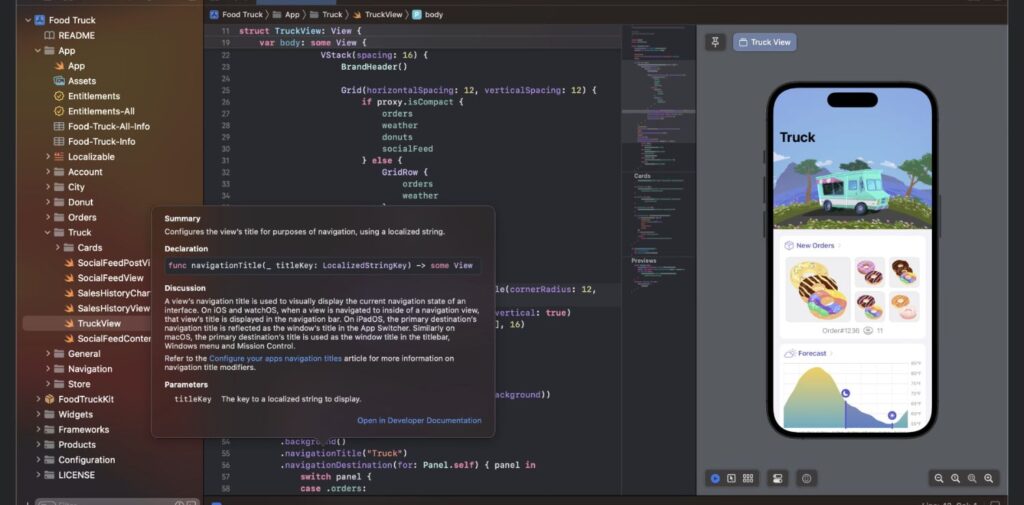
- It has everything in one place – a code editor, a simulator to test your app, and tools to find and fix mistakes.
- It supports Swift and Objective-C, which are programming languages used for Apple devices.
- It helps even beginners to start learning how apps work.
- You can actually see how your app will look and feel while making it.
So for someone like Ravi, who dreams of making a game, Xcode is the perfect starting point.
How does Xcode help you make an app?
Let’s say Ravi wants to make a small game where a bird flies through the sky. Here’s how Xcode would help him:
First, Ravi opens Xcode and chooses “Create a new project.” He selects the type of app he wants to make, maybe a game using the SpriteKit option (a tool inside Xcode for making games).
Next, he starts writing his code using a language called Swift. Don’t worry – Swift is like English for computers. It’s easy to read and understand.
While writing code, Ravi can also see how the game will look using the preview option in Xcode. If he makes a mistake, Xcode will show a warning and tell him what to fix.
Once the game is ready, Ravi can test it on a simulator – this means he can play the game on a fake iPhone screen inside his computer.
After testing, Ravi can even share his game with others if he has a developer account.
Just like that, Xcode helps turn his idea into a real game.
What are the parts inside Xcode?
Xcode might look big at first, but it is neatly organized. Here are some of the main parts:
- Code Editor: This is where you write your code.
- Interface Builder: This is where you design how your app will look, like where the buttons and images will go.
- Simulator: This lets you test your app on different Apple devices, like iPhone 13 or iPad Air.
- Debugger: If there’s a mistake in your code, this tool will help you find and fix it.
- Project Navigator: This helps you find and open files in your app project easily.
All these tools work together like team players to help you build something wonderful.
Who can use Xcode?
Anyone who has a Mac computer and wants to learn app development can use Xcode. Even if you are a student in Class 4 or 5, you can slowly start learning the basics of coding and try Xcode.
In many schools in India, especially in big cities like Mumbai, Bangalore, and Delhi, teachers are introducing coding as a subject. Students are learning to create simple programs and games. If your school has computers and teaches coding, you can ask your teacher to show you how to start with Xcode.
Even at home, there are free websites and videos where you can learn how to use Xcode step by step.
Some fun facts about Xcode
- Xcode was first released in 2003 – that’s even before Ravi was born!
- Apple updates Xcode every year to make it better.
- Many famous Indian app developers started their journey by learning Xcode.
- If you make an app using Xcode, you can publish it on the App Store where millions of people can use it.
- Some kids have even earned money by making simple games using Xcode!
Is Xcode only for serious app makers?
Not at all! Xcode is for everyone. Whether you are just curious or want to become a professional app developer, Xcode welcomes all. It’s a great tool to learn, play, experiment, and grow.
If you’re someone who loves technology, computers, or even video games, learning Xcode can be a super fun activity. You can create your own stories, games, and ideas – and one day, you might even become the next big app creator from India!

Final words – Should you try Xcode?
Definitely yes! If you have an Apple computer and love creating things, Xcode is like a magic box. It gives you the power to build your own apps and games. You don’t have to be a computer expert to start. Even a 9-year-old child like Ravi can begin exploring and enjoying the world of app development.
Remember, every big app started as a small idea. And tools like Xcode help turn those small ideas into real things that people use every day. So, keep dreaming, keep exploring, and maybe one day, we’ll all be playing your game or using your app on our iPhones.Who knows – the next big Indian app might be made by you!